
🔋 Ultimate Solution For: Abnormal battery drain | Helio G85 throttling | 18W fast charging failure | Gaming FPS drops | Touch response lag
🚀 Why This Firmware?
🎮 Gaming Mode
Unlocks full Helio G85 potential (Mali-G52 MC2)
🔋 Battery Master
Restores 6000mAh actual capacity
⚡ Fast Charge
Fixes "Charging slowly" warning
⚠️ Critical Pova Neo Fixes
- PUBG/BGMI Lag: FPS drops below 40 on Medium
- Overnight Drain: Loses 15-20% when idle
- Charging Fault: Stuck at 5V/1A (not 9V/2A)
- Touch Delay: 80ms response during gameplay
- Thermal Throttle: CPU clocks drop after 10mins
🔧 Must-Do Before Flashing
- Use SP Flash Tool v5.2016+ (G85 optimized)
- Backup fuel_gauge partition for battery stats
- Disable Game Mode temporarily
📚 Flashing Guide
Professional method:
Helio G85 Performance Flashing Protocol
⚙️ Hardware Specs
- Chipset: MediaTek Helio G85 (12nm)
- Android: 11 with HIOS 7.6
- Key Partitions: fuel_gauge, thermal_config, gpu_dvfs
💎 Gamer's Toolkit
- GPU Overclocking Guide (Mali-G52)
- Battery Health Calibration
- Touch Sampling Boost
Download the necessary tools and drivers:
MTK USB Drivers SP Flash Tool (with Auth Bypass) DA Auth File SP Flash Tool V5 1824
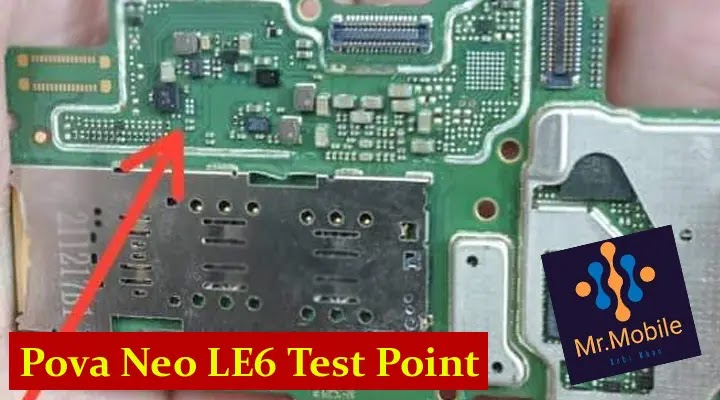
|
| Tecno Pova Neo LE6H Test Point (Fix Brom) for Repair Original IMEI Dead Boot Repair Flash Without Cridet Tecno Pova Neo LE6H isp pinout Tecno Pova Neo LE6H test point for brom mode |